Just in case you missed...

/ 11:28 pm

Pagico 3.2 Beta is in progress (Latest: v3.2.0.83)

If you’re looking for the latest beta build, this is the right place for it.

For Windows: Download (System Requirements)

For Mac: Download
42 Responses to “Pagico 3.2 Beta is in progress (Latest: v3.2.0.83)”

  1. David, :

    Is there any way to re-set for a trial period? Now that you have made major changes it may be worthwhile for some of us to take another look….coming from a Daylite and Contactizer owner.

  2. Chris Roberts, :

    I’ve been using the beta - it really is great. I wanted to alert you to a couple things I’ve noticed that you may be interested in.

    1. When I link to a folder from a topic, the folder icon and type is listed as “Unknown”, the default title is also “Untitled”. The link works and when I double click it, the folder opens up in Finder. However, with the icon and type as Unknown, it looks a little strange.

    2. The latest version of Apple Mail has a feature titled “Copy Message URL”. I tried pasting a message URL in a text field but Pagico doesn’t recognize it as a hyperlink. Is this a feature that could be added?

    3. This is a small issue but would be great to have. When adding a document, it can be a little annoying if the document you need is not one of the four in the drop down bar. Can there be a sub-menu of sorts that lists all the other document types? Even better, can there be a way where I can add my own document templates for any application I have?

    I’m sure you already have some of these ideas on the list of to-dos. Thanks again, I’m enjoying your application and plan to continue supporting it.

    Chris

  3. Meng, :

    Hi Chris:

    I’m happy to know that you liked it!!
    Here are the responses to the issues you mentioned:
    1. It seems to be a simple bug, which is going to be fixed in our upcoming release.
    2. That feature doesn’t appear on my machine (10.5). It seems to be an additional feature introduced by MailTags. But anyway, this *was* supported, but not any more due to some system upgrade. But we’re going to make it work again, very soon.
    3. It’ll be very easy for you to re-configure the four icons in the drop down bar. And after you do that, simply use the “Go Back” feature (keyboard: Cmd+Left Arrow) to return to your previous topic. Displaying all of them in your topic simply takes too much space.

    Also, making your own shortcut would be fantastic, if only with proper tools. But before that happens, you can let us know what application you need and we’ll probably be able to make it for you. If that’s not a very rarely-used app.

    Hope my answers help!

  4. Jean-Claude, :

    Hi Meng,

    I’ve just updated my Windows version and I still have the problem that when you type in an activity under a relation, it does not display.

  5. Meng, :

    Got it, Jean. Will look into the issue.
    Thanks for mentioning!!

  6. Jean-Claude, :

    Hi Meng,

    I wonder how you are doing with fixing the Activity bug in the Relations.
    I do use it a lot on my Mac and I’m missing it in Windows.
    It would be very much appreciated.
    Many Thanks

    JC

  7. Enrico, :

    Using pagico since 2 days and loving it! I’ve lost months looking for the right tool, which is:
    - more smart than an outliner and less complex than a project management system
    - capable of smart relations between everything
    - with a great UI
    - not too expensive

    I’ve tried EVERYTHING, loosing weeks and money in tools that were not… well, right!

    Anyway, even if Pagico concept is perfect, I guess you’re still working heavy on bugs of the new 3.2… I’m writing you to let you know about the issues I’ve found:
    1. many labels are missing, bot in preferences and in pages
    2. not every task has a date, but in the task list there are only tasks with a date
    3. changing the gantt interactively from the dashboard could be the final feature… I don’t have to tell you, right? ;)
    4. imported some contacts from address book (the direct drag&drop is broken, I had to get the vcf from the desktop) and all of them have a “company” field, but the auto-group did not appear and I need it

    Now I have to go, more of them later ;)
    Great great work!
    Bye
    Enrico

  8. WPS, :

    Some more Windows XP bugs:

    1) clicking “Save As…” on a file stored in a topic results in a 404 error (but clicking on the file’s icon works as expected).

    2) Choosing “New Folder” does nothing (that I can see); dragging a folder in does work, but I’m unable to open or save it.

    3) The release notes on v3 says: “Ability to link to file rather than duplicate files into the database.” I don’t see that functionality; is it there yet in the Windows version or am I missing something?

    Thanks!

  9. WPS, :

    One more question:
    Is it (or will it be) possible to export contacts?

  10. Meng, :

    Thanks WPS!
    The issues you mentioned will be fixed as soon as possible. A new bug-fix release will be made for this.
    The feature of linking external files and folders is not available in Windows, yet. Once it’s done, you’ll be able to control+drag to link to files, rather than duplicating them again and save in the database.

    In terms of exporting contacts, are you referring to export contacts in vCard (.vcf) format? Or any readable format just like exporting topics?

    Many thanks!

  11. Meng, :

    Hi Enrico:
    I’m glad that you liked our concept! Yes, we are still working on bug-fixes for the 3.2 on Windows.
    About the issue #1 you mentioned, what language are you using in the program? German?
    2. I’m sorry but I don’t quite follow you on this issue. Could you elaborate a little bit on it?
    3. Yes, this feature will be great, and we’ll add it in the near future.
    4. About the company field in all your contacts, how many different companies do these contacts belong to? If all the company field are different (let’s say, just like the telephone field), then the auto-group feature isn’t going to group it. As long as multiple contacts belong to a few company (less than the number of the contacts), the feature will start working for it.

    Many thanks for your input, and I’ll be working on the issues you mentioned. Also, I’m looking forward to your replies!

  12. Enrico, :

    Meng, thank you for your feedback!
    Some answers,
    1. My language is italian (and I work on Mac)
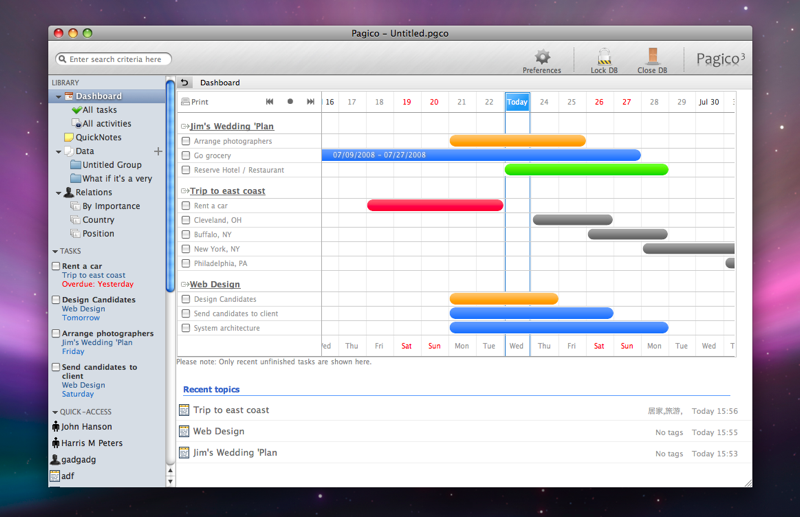
    2. it’s easy, if a topic doesn’t have a task with a date, it doesn’t appear in the dashboard but I need to see those tasks too, since I could forget about them (they could be topics that remain hybernated for a long time). So I guess that there should be a different dashboard view with all the topics, maybe listed for the date of last activities on them, even topics without any “dated” task. Just like the “Recent topics” list but including every single topic present in the DB.
    4. ok, now I get it! I’ll make some tests

    In the meantime I’ve found another strange behaviour, in the relations list even if many contacts have an email just some of them appears. It was fine until I started to input the CSV files, after thta it started to behave unconsistently (the same happened for the group “companies” I already told you about).

    Regarding the Relations list, is it possible to consider to let the user configure the columns to show the data he needs more, and not just the email? I’ve the emails in Apple Mail and I really don’t need to have them listed. I’d need more the phone numbers or a different field, maybe a custom one.

    Thank you very much!
    Enrico

  13. Meng, :

    Hi Enrico:
    I haven’t got time to go over all the issues you mentioned, but here is just a quick answer to your issue No.2:
    If you would like to list every singl topic present in the topic, why don’t you switch over to the “Data” tab? There is a list for all the topics available.

    Let me know if that’s what you mean or not. ;-) Many thanks!

  14. Helen, :

    how can i ‘un’ archive something? I can’t find anything in support anywhere to answer this. Hope someone can help.

  15. Meng, :

    Hi Helen:
    I’m sorry but you can not un-archive items right now. The archiving is a one-way process.

  16. Jean-Claude, :

    Hi Meng,

    I still have the issue with Activities not displaying.
    Have you been able to fix it?
    Thanks

  17. Meng, :

    Hi Jean:
    Yes, I understand and am aware of that issue. However I am still working on it.

    This issue occurred very rarely, and it might take a while for me to exactly locate and fix the problem.

    But, I do suspect that issue occurred during the database conversion when you upgraded from 2.x. So, just a question: do you have a Mac running Pagico with the same database? And can you see your activities on Mac with the exactly same database?

    Many many thanks for your info!! I really appreciate that!

  18. Jean-Claude, :

    Hi Meng,

    Thank you for the quick turn-up.
    I do have a Mac with Pagico too but I do not pass the database between the PC and the Mac because I work on separate business on the PC and on the Mac. The issue may have occured during the conversion but I really need the activities working on the PC. Your software is so good it is becoming addictive and I am using it extensively. One only note, I prefered the layout of the previous version with the Tabs on top, it was more nicer I think. Just a personal opinion.
    Thanks for your help.

    JC

  19. Sapphie, :

    Hi

    Have just come across Pagico and I find it interesting but am not yet convinced that it is for me.
    Anyway, on Windows, the Print option brings up an IE window and doesn’t let you save as PDF. Will that be possible?

    Also, why can’t I resize the Pagico window horizontally? A pane divider separating the links on the left with the rest of the app would be useful, so we can change the relative size of the panes.

    Sapphie

  20. Sapphie, :

    Hi

    On Windows … if I drag and drop a folder it goes into Pagico Ok but how do I open it? All I can seem to do is click on the Save As link which then opens up blankish IE window and my Pagico window is gone.

    Similarly if I drag and drop a PDF file into Pagico, I only seem to be able to open it via the Save As link and again Pagico dissapears.

    Is it possible to *link* to a folder in Windows, so that you can open it up and see the contents of the folder … and then select a file from within it?

    Lee

  21. Meng, :

    Hi Saphhie:

    Thanks for leaving comments! About the files and folders dragged into your topic, of course you can open it! Just double-click on the icon as you would in your file manager.

    Thanks!

  22. Sapphie, :

    Meng

    Thanks, OK, I feel a bit silly now, double-click wasn’t working but maybe I I wasn’t clicking in the correct place. Doing so on the icon now seems to work for me!

    BTW, Control-Drag doesn’t yet add links in Windows does it?

    Also, the keyboard shortcuts like Ctrl-2 to go to Quick Notes doesn’t work.

    It would be useful to be able to tag Quick Notes and Tasks.

    Thanks
    Lee

  23. Sapphie, :

    Meng

    Sorry for all the comments!

    I tried exporting a topic that had a PDF attached and it didn’t copy the PDF to the files folder in the export ZIP, so the link on thr web page created doesn’t work.

    I am using Windows version

    Lee

  24. Meng, :

    Hi Shapphie:

    No, don’t be sorry, instead we should be, for having so many troubles for you.
    Thanks for letting me know about the issue, I’ll look into it. Right now it does sound like too many issues, but that’s the whole point of Beta. Right?

    Thanks for all the info. It’ll definitely be fixed before the final release.

    Meng

  25. Sapphie, :

    If I enter a URL in the WYSIWYG editor for a topic etc it looks ok in edit mode but then displays weird outside of edit mode. I am not sure what is going on but it make be due to particular characters, such as TAB or a ? in the URL.

    Are you aware of this bug? Windows version.

    Actually do you have a list of currently known bugs with the beta that you can publish?

    Lee

  26. Enrico, :

    Meng,
    since Pagico in Italian (on Mac) is difficult to use (many labels are missing from buttons and links) I’d like to use it in English, but I’m having problems. I tried to strip italian resources from Pagico but it remains localized (!?). Then I tried to set my OSX in english, and Pagico keeps launching in Italian. I don’t know what to do. How did you do that?? It looks almost magic! :))
    Pls, Let me know!
    Enrico

  27. Meng, :

    Hi Enrico:
    I’m sorry for the issue. But at the mean time, we *just* finished the Italian localization for the program, so you can now download it again and install. After which you’ll find all the missing labels are now there.

    Also, if you would like to switch to english language, just click the “wheel” icon (preferences) in the tool bar, then select “English” in the language selection list.

    Thanks!
    Meng

  28. Enrico, :

    Oh, yes, the language selection is in the preferences!! LOL, I tried everything! :)
    Anyway now I can use italian, it works perfectly!
    Thank you Meng!

  29. Enrico, :

    Meng, I guess that in the dashboard there should be even a list of all the active topics, even the ones without tasks. I always look for them in the dashboard and I get anxious when I don’t see them.
    Maybe you could create a right panel, that could be collapsed, with extra info like:
    - topics list (scrolling)
    - contacts list (scrolling)
    - quick note panel (as in the 3.1, it was quite useful in that position)

    I feel that the dashboard, to be really useful, should give access to EVERY important area of my working environment, otherwise it’s just a simple “calendar view” of the created tasks.

    Anyway, thanks for the effort! Pagico is getting better and better!
    Enrico

  30. Meng, :

    Hi Enrico:
    Thanks for the input! I really appreciate it!
    The QuickNote panel is definitely going to be added, very soon. So don’t worry about that.
    However, about listing every single thing in your library in the dashboard, I don’t think we’re gonna add it any time soon. Stuff were not displayed in the view because they didn’t have anything to do with schedule, then why should they be there? Just imagine that there are hundreds of topics in the library (just like me), and only a few of them are related to your current schedule, why would you need everything else to be listed as empty lines?

    Just kinda curious. And thanks for your input! :-)

  31. Sapphie, :

    Meng

    I am sticking with V2 on Windows for the moment. Another issue I have, if I run the upgrade to the latest V3 beta, some of my tags are missing, eg in tagExplorer or from the selection list when tagging a new topic. I’m not sure if the upgrade process and data conversion is dumping some of them.

    Is this a known issue?

    Lee

  32. Enrico, :

    Yes, I get your opinion on . I guess it’s in the way we (me and you and millions of people out there) handle tasks. I usually keep a repository of tasks that I will face sometime in the future. Tasks like “buy that book” or “call that friend” for which defining a deadline is just wasting time, but at the same time I don’t want to forget (there’s a better place to loose something than a long list of old and forgotten topics!?)
    Right now Pagico, for a task to appear in the dashboard (or even in the task list), force me to define a deadline, so I have this tasks with a date defined and I have to postpone it week after week. Time waste!
    Sometimes this problem occurs even for entire topics, with multiple tasks and notes, that have to be done sometimes in the future and risk to be forgotten if not archived.
    Maybe there’s an easy way to handle this kinda stuff in pagico, but I’ve not yet find it so please tell me! :)
    Right now I’ve defined a tag “Archive” and a dynamic group called “active topics” that list all the topics that DON’T HAVE the “Archive” tag, but for the single tasks with no deadline I’ve not yet found a solution…

    Bug report:
    1. if I have a list with multiple tasks and I click on two or more of them for editing, opening them up altogheter, when I click save on one of the edited tasks, Pagico close all the open tasks but save just the one I clicked on. If it’s not clear tell me ;)
    2. I write a note and I put in it a list (nice feature!), then save it and afert a while I click again on it to modify it, the list lose its CRs and become a single row, no more a list. again, if it’s not clear tell me.

  33. Sapphie, :

    I agree - we NEED to be able to specify tasks with no due date. They are effectively ASAP.

    The problem I have found is finding good task management software that ALSO allows you to store information. I have been using ThinkingRock for GTD - that allows all sorts of schedule related stuff but isn’t quite so good at storing information.

    If Pagico could improve it’s task related features it would be perfect - eg:

    1. Allow tasks with no due dates
    2. Allow tasks with *time* as well as date (eg for meetings etc)
    3. Allow recurring tasks … this is probably harder though. I’d be happy with 1 and 2!

    Lee

  34. Sapphie, :

    Followup:

    I see you can create tasks with no due date but the problem is they don’t show up in lists of tasks.

    Two other observations:

    1. When ‘advanced’ is enabled so that you can specify the *start* date, this only works in topics, not in people - could this be added please?

    2. the pop-up calendar doesn’t display the name of the month! This makes choosing a date a little awkward - can this be changed please?

    I am on Windows. Both of the above apply to V2 and V3.

    Lee

  35. Enrico, :

    Sapphie,
    I totally agree with you agreeing with me :)
    The task without date are possible but are not visible. They have to have their own place in pagico as they have in our life.
    I have the same problem with sw that let you handle tasks but not informations, Pagico is great but has some quirks that I’m sure Meng will solve very soon.
    The month without date is nasty, and the recurring tasks… ahh, the recurring tasks… they’re fabulous and are the nirvana of task management. There’re so few applications able to handle them…

    Reganrding the advanced date managemnt, with start and end date, I have another observation. Even if it’s active, as I need it always, I could need to enter a task without start date because it’s a milestone… milestones, for instance, doesn’t start on the date I enter them. They start the same day they end. So, basically, I think that in the prefs, in the moment we choose to have advanced date management, we also need to specify how to handle the task where only the end date is specified. If they have ti start at the creation date, 3 days before the end date, the same day they finish, etc. It’s important since, I guess, everyone of us has a different “startup period” to start considering a new task before facing it. What do you think of it?

  36. Meng, :

    Hi Sapphie & Enrico:

    Thanks for your inputs! Sorry for not replying you guys sooner but… here it is. :-)

    First of all, the “Advanced Task Management” option applies to both topics and contact profiles. Sapphie, you said it wasn’t in people, probably because you were looking at the wrong place? This option applies to “tasks”, so you should see this feature when you’re adding / editing a task in a person’s profile. It is not available in “activities”, though.

    Adding the month name in the calender, that’s definitely gonna be added, very soon. No worries. :-)

    Hmm, I see your points, regarding to the “tasks without due dates” thing. I’ll think about it and get back to you guys soon, all right? Thankfully I don’t think we’ll need to communicate in this post any more. When I got the idea, I’ll create a new post.

    @Enrico: About one of the issues you mentioned, “opening multiple lists and saving one of them will cause all of them re-rendered”. This is, well, technically normal (shame). The program needs to re-render the whole segment (the entire list item) once you hit the “save” button, as it needs to recognize some of the content and do some transformation (URL links, email links, etc), which might effect the layout of the entire segment. But I’ll work on it. So for now, please try to modify one list item at a time.

    Many thanks guys!

  37. Meng, :

    @Sapphie:

    I am going to answer one of your questions about “Setting due dates with time” in a new post. :-)

    Thanks!

  38. Enrico, :

    Meng, the more topics I have, the more I need to move the task dates fast and with no hassles. I have many tasks which are late or need to move each day on the gantt chart, and everytime I want to edit their dates I have to enter in the topic and change it by typing in the right boxes.
    I’m getting crazy (and dropping Pagico as a fast repository of my tasks)!

    The solutions I see are two:
    1. the best one, I can move the task bar with my mouse and shorten/lenghten as I need
    2. the good one, I have a small task info window where i can edit the task from the dashboard, changing the dates without entering in every single topics.

    What do you think of this problem? Is it something you were considring?

  39. Sapphie, :

    Enrico

    Will the new stuff detailed in the latest post cover this for you?

    Lee

  40. Enrico, :

    Yes, I guess :) It’s quite a coincidence that Mang post this, since I hadn’t read it before posting mine.
    Now I’m waiting that he realese this version!

  41. WPS, :

    Hello:

    >> In terms of exporting contacts, are you referring to export contacts in vCard (.vcf) format? Or any readable format just like exporting topics?

    I was referring to exporting into a standard format like vCard or even CSV; just some way to get the data back out of the single file database so it isn’t “trapped.”

    Thanks!

  42. Meng, :

    Hi WPS:

    The VCard format is not gonna be sufficient when exporting the information contained in contact profile, as the format doesn’t have the capability of storing complex information such as activities, file attachments, and tasks in the profile.

    However, you do have the option of exporting the profile as a PDF file so you can archive it, or print it out. Will this work for you?

    Thanks!

Leave a Reply

Privacy Policy Terms of Use Site Map Contact About Us © 2005-2007 Pagico Software, Inc.
All rights reserved.