
July 13, 2008 / 6:41 am

Pagico 3.2 for Windows Public Beta is now available!

Pagico 3.2 for Windows

Howdy folks! I know this is a long waited news, and many friends have been asking for it for a very long time. But here it is!

The public beta of Pagico 3.2 for Windows is available now! For those who can’t wait to get started, please go ahead and download the beta. Make sure to back up your data before installing it if you’re upgrading your existing Pagico software. More details are covered below.
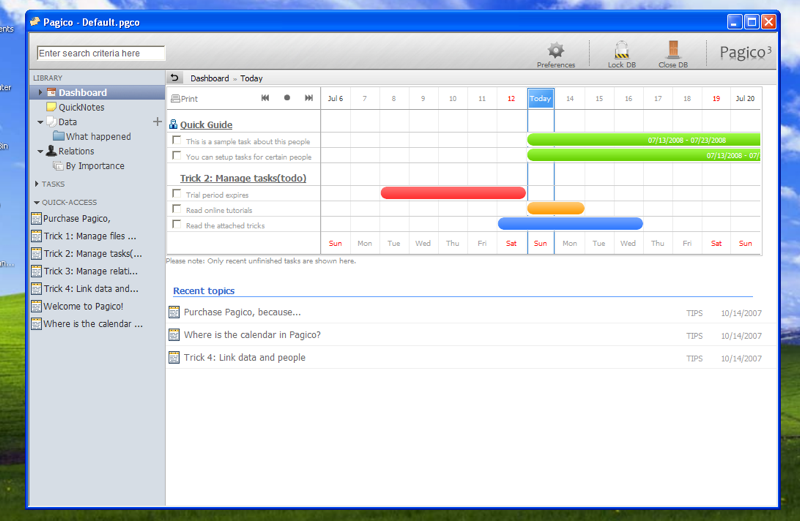
As usual, this is the beta for Pagico (Standard) edition, which comes with a 15 day free trial period if you’re installing it for the first time. If you’re already a Pagico (Standard) user, you’ll have to use your activation code again to activate it after installation.

System Requirements

Windows 2000 / XP.
Internet Explorer 7 or higher.

Windows Vista?
We haven’t tested it on Vista yet, but it should work. However, there might be small UI glitches on Vista systems. If so, please attach a screenshot when reporting the bugs. Many thanks in advance! :D

Internet Explorer 6?
Please note that Internet Explorer 7 is required. Because the outdated CSS and PNG transparency support, we’re sorry but have to drop the support for IE 6.

Upgrading your existing Pagico software

When you first launch the new Pagico 3.2, the program will automatically detect and update your old existing database. So back up your Pagico folder (C:\Program Files\Pagico) before installing the 3.2, just in case.

This is a BETA

Although this 3.2 has been tested on our machines for a period of time, it is still a beta. This means that it might contain bugs and glitches here and there, and your feedbacks are needed. Please feel free to get back to us.

Download and Try

To get started, please go ahead and download the beta.

Don’t forget to provide feedback! We’d love to hear what you think!! :D

7 Responses to “Pagico 3.2 for Windows Public Beta is now available!”

  1. Yolanda, :

    Hello,

    I have downloaded the beta version and am using it on Vista and it seems to work fine apart from the fact that the window will not expand fully i.e. the largest pagico will go is two thirds the width on the screen - I will email screenshots to you.

    I think it is fantastic software but I gotta say it still makes me very nervous not being able to back up tasks, contacts etc to a standard format like excel for example. I know you are trying to make it easy but for those of us who have lost data before, it is not enough to rely on one form of backup. I know you can export pages to HTML etc. but the key is to be able to save data in other formats that normal users understand and use again outside of pagico.

    I love this software, but like I say, am nervous about relying on it completely.

    Apologies if this has been covered already in another post.

  2. Meng, :

    Hello Yolanda:
    Thanks for the comments on Pagico! About the window width in Vista, it’s normal. Pagico across all platforms will only take advantage of 1024 pixels in width. So actually you won’t be able to adjust the width

    Yes, I totally understand what you’re saying As of now, the ability of using standalone databases have increased a lot of reliability of Pagico, in terms of backing up data.

    Exporting data to Excel or other database format, is not so easy. Because in most cases, users will have file attachments in topics (and profiles), which makes it really tricky to generate an excel file (or any database file) with file attachments.

    Having said that, we’re still looking for ways for users to export data, making Pagico even better. Thanks for the comments!!!

  3. pligg.com, :

    Pagico 3.2 for Windows Public Beta is now available!…

    Howdy folks! I know this is a long waited news, and many friends have been asking for it for a very long time. But here it is!

    The public beta of Pagico 3.2 for Windows is available now! For those who can’t wait to get started, please go ahead and d…

  4. Robert, :

    For the Windows version.

    1) In topic.
    2) Click the double down arrow to ‘create a new file’
    3) The create a new file box opens
    4) Click ‘plain text file’
    5) The create a new file box closes
    6) Nothing happens

    Same for Word, PowerPoint and Excel.

    Tried on both a Vista and an XP machine.

    Love the app. Hope this helps.

  5. Jean-Claude, :

    Hi Meng,
    Great stuff! Thank you very much.
    I’ve already started using it intensively as I had it on my Mac for a while.
    A bug I found in the DATA side. If you enter text in a text box, you can’t go to the next line with the Enter key. I don’t know why.

    A suggestion for improvement: one can currently archive tasks assigned to a person but not tasks in a DATA page. It would be great if we could, that would allow keeping the page clean without losing the historic of actions.

  6. Meng, :

    Hi Jean:

    Thanks for the comments!

    A quick work-around for the “enter” bug: Just tap “Tab” once when you’re typing texts. By doing so, you’ll be able to enter line breaks with “enter”, although it doesn’t look like you’re doing it right.

    We’re looking into the issue, and hopefully we’ll fix that asap.

    About the Archive feature for topics, the answer is: yes, we have thought about it, and we’ll probably add it in the future.

    Thanks very much!

  7. Pagico Blog » Pagico 3.2 Beta is in progress (Latest: v3.2.0.80), :

    [...] Pagico 3.2 Beta is in progress (Latest: v3.2.0.80) For Windows: Download (System Requirements) [...]

Leave a Reply

Privacy Policy Terms of Use Site Map Contact About Us © 2005-2007 Pagico Software, Inc.
All rights reserved.